How to Automate Repetitive Tasks and Win Back Your Time
Feeling overwhelmed by the daily grind? Discover how to automate repetitive tasks at home. This guide gives busy parents the tools and strategies to save time.
Love This Article?
Get personalized meal plans with recipes like this, automatically matched to your nutrition targets.
So, you want to automate the boring stuff? Fantastic. The trick is to first pinpoint the recurring chores gobbling up your time, then pick the right tools to take them over, and finally, set up simple systems that run on their own. For most of us parents, this means starting with meal planning, grocery shopping, and juggling schedules. Getting those on autopilot can literally give you hours back every single week.
Escape the Never-Ending To-Do List
If you feel like you're living the same day on repeat, stuck on a hamster wheel of chores, you're in the right place. Let's be real: your day feels like an endless loop because it is an endless loop of tiny, repetitive tasks that drain your time and soul. But I promise, there’s an escape hatch.

This isn't about turning your home into something out of The Jetsons overnight. It's about making small, smart tweaks that add up to big wins, handing you back precious hours of your life. We’re going to walk through exactly how to put those mind-numbing, repetitive tasks on autopilot.
Reclaiming Your Time from Household Chaos
Let’s talk about the “invisible workload.” It’s the constant “what’s for dinner?” circling in your head, the mental gymnastics of remembering who has soccer practice and when, and that Sunday night scramble to pull a grocery list out of thin air. These are your personal "time thieves"—sneaky little chores that gang up on you, leaving you exhausted before the day is even done. It’s not just in your head, either. A survey of over 2,000 employees found that a whopping 60% of their time was spent on duplicative tasks. Sound familiar? That’s basically a Tuesday for a busy parent.
This guide is your battle plan. You'll learn how to:
- Spot the exact tasks that are creating the most friction in your day.
- Pick the right tools and strategies that actually fit your family’s life (and budget).
- Build dead-simple workflows that transform daily chaos into calm, predictable systems.
The Real Goal of Home Automation
Here's the secret: learning how to automate repetitive tasks isn't just about being more "productive." It's about fighting decision fatigue. Every little choice you make—from what snacks to pack to which bill to pay next—chips away at your mental energy. By putting these decisions on autopilot, you free up your brainpower for things that actually matter, like being present with your kids, reviving a long-lost hobby, or just enjoying a moment of silence.
The real magic of automation is reclaiming your mental bandwidth. When you stop sweating the small stuff, you have more energy for the big stuff—the moments that actually make up your life.
For instance, picture this: your entire weekly meal plan, complete with a ready-to-go grocery list, just appears for you, perfectly tailored to your family's preferences. This isn't science fiction. It’s exactly what tools like Meal Flow AI were built for. Just that one change can slash hours of stress from your week.
Throughout this guide, we're zeroing in on high-impact automations like that one. Forget complicated coding or pricey gadgets. We're talking simple, actionable steps that give you immediate results. By the end, you won't just have a tidier house or a better-managed schedule; you'll have a system that works for you, giving you back the one thing you can never make more of: your time. Let's dive in.
So, What's Stealing All Your Time?
Before you can automate anything, you have to know what you're up against. Think of it like a detective mission in your own home. Your job is to identify the sneaky culprits that are constantly picking your pocket for time and energy. This isn't about starting another massive chore; it's a quick, honest "time audit" to figure out what's really worth automating.
Just pay attention for a couple of days. Keep a running note on your phone or a beat-up notebook on the counter. Every time a task makes you sigh, roll your eyes, or feel that familiar wave of "Ugh, this again?"—write it down. Those are your prime targets.
The Hunt for the Repeat Offenders
Your biggest time-sucks are usually hiding in plain sight. They’re the things you do on autopilot, the background noise of your daily life that, when added up, becomes a deafening roar. We’re talking about the mental gymnastics of creating a grocery list from scratch every week, the nightly "I don't know, what do you want for dinner?" debate, or trying to merge three different family calendars just to book a dentist appointment.
It’s a real thing. A friend of mine, a mom of two toddlers, did this and had a total lightbulb moment. She figured out she was wasting nearly 30 minutes every Sunday just staring into the abyss of her refrigerator, trying to conjure a week's worth of meals out of thin air. That was followed by another hour of list-making, only to get to the store and realize she'd left the list on the kitchen counter. Again. That one-two punch of meal planning and shopping was her personal energy vampire, sucking the life out of her Sunday nights.
This isn’t just a parent problem, by the way. In the business world, a shocking 51% of employees spend at least two hours a day on repetitive work that could be automated. Getting that time back by automating can slash those tasks by 60-95%. (You can dig into more of these stats over at Docuclipper.com). Imagine what you could do with that kind of time!
Let's Make an "Automation Hit List"
After a few days of observation, it's time to assemble your "Automation Hit List." This isn't a chore list; it's an inventory of all the tasks that are begging for a better way. Take your notes and start grouping them.
You might end up with something that looks like this:
- Meal Prep Madness:
- The "what's for dinner" debate
- Writing out the grocery list (for the 500th time)
- Googling "easy weeknight recipes" until my eyes glaze over
- Calendar Chaos:
- Texting my spouse to see if they can do school pickup
- Manually typing in every single school event
- Forgetting to set reminders for soccer practice
- General Household Grind:
- That last-minute panic when we run out of diapers
- Forgetting to pay the water bill... again
- Sorting the endless pile of junk mail
This list is your roadmap. It shows you exactly where the pain points are. Don't get overwhelmed and try to fix everything at once. Just circle the one or two things that make you want to pull your hair out the most.
Pinpointing your biggest time waster is the most critical step. Solving that one problem first creates a domino effect, freeing up the mental space you need to tackle the next one.
For most parents, that "Meal Prep Madness" category is public enemy number one. It's a daily, relentless grind of decisions, planning, and work. That’s exactly why going after it first gives you the biggest, most satisfying win. By flagging it as your top priority, you’ve already won half the battle. Now you have a clear mission: find the right tool to take down that specific time-wasting giant.
Choose Your Automation Tools and Strategies
Okay, you’ve got your "Automation Hit List" and you’ve circled the biggest, baddest time-waster of them all. Now for the fun part: picking your weapons. Deciding how to automate repetitive tasks can feel like walking into a massive hardware store—so many shiny tools, but which one actually does the job?
Let’s keep it simple. Your options really fall into three main buckets.
Digital Apps, Smart Home Devices, and Simple Systems
First up, you've got digital apps. These are the workhorses living on your phone or computer. Think of things you might already use, like a shared family calendar or automatic bill pay. They’re fantastic for handling the mental load.
Then you have smart home devices. These are the physical gadgets that do the dirty work for you—robot vacuums, smart plugs, maybe even a voice assistant that reads you the weather while you're trying to find a matching pair of socks. They're perfect for automating the physical chores.
And finally, there are system-based strategies. This is less about tech and more about clever habits. Ever heard of "batching"? That’s when you knock out all your meal prep for the week on a Sunday afternoon. Creating a rock-solid laundry schedule is another one. These systems are the secret sauce that makes your tech tools even more powerful.
The real magic happens when you mix and match. A great automation strategy often combines a clever app with a smart system. The app does the thinking, and the system turns that thinking into action.
The Meal Prep Battleground: A Clear Example
Let's zoom in on the "Meal Prep Madness" you circled on your hit list. It's a perfect candidate for automation because it's a constant, nagging drain on both your time and your sanity.
For years, the options were pretty clunky. You could wrestle with a manual spreadsheet, which is just a glorified, self-inflicted chore. Or you could scroll endlessly through generic recipe apps. They give you ideas, sure, but they still leave you with the heavy lifting of piecing together a cohesive plan and a grocery list that isn't a chaotic mess.
This is where a specialized tool completely changes the game.
An app like Meal Flow AI isn’t just another digital recipe box; it’s an automation engine built to obliterate the whole decision-making process. You just tell it your family’s preferences, any dietary quirks, and what’s already hiding in your pantry, and—poof—it generates a complete weekly meal plan.
But here’s the crucial part: it then creates a categorized, ready-to-shop grocery list you can zap straight to Instacart. No more "what’s for dinner?" dread.
To see how different tools stack up, check out our deep dive into the best **meal planner software** and see what fits your family’s rhythm.
Comparing Meal Prep Automation Methods
Sometimes you need to see it laid out to really get it. Choosing the right method all comes down to what you value most—your time, your money, or your desire to customize every little detail.
This little chart breaks it down.
| Method | Weekly Time Investment | Key Features | Best For |
| Manual Spreadsheets | 2-3 hours | Total control over every detail, free to use. | The parent who actually enjoys the process of detailed planning and has the time to spare. |
| Generic Recipe Apps | 1-2 hours | Recipe discovery, some list-building capabilities. | Finding new meal ideas but still requires significant manual planning and list consolidation. |
| Meal Flow AI | 10-15 minutes | AI-generated plans, automated grocery lists, Instacart integration, pantry tracking. | The parent who wants to reclaim hours every single week and eliminate decision fatigue completely. |
Looking at it this way, the real cost becomes obvious. A spreadsheet might not cost you money, but it costs you hours. An app like Meal Flow AI hands those hours right back to you. For any busy parent, that's priceless.
Expanding Beyond The Kitchen
This same logic applies everywhere else in your home.
Tired of the daily crumb patrol? A robot vacuum automates that. If you're tackling even bigger cleaning jobs, understanding how a central vacuum system works can show you how built-in systems tackle repetitive tasks on a much larger scale.
The key is to match the tool to the specific pain point. Is the problem mental load, like planning meals? An AI-powered app is your new best friend. Is it a tedious physical chore, like cleaning floors? A smart device is the hero you need.
By thoughtfully choosing your tools, you're not just buying gadgets; you're buying back your time and your peace of mind.
Build Your First Automated Household Workflows
Theory is great, but let's get our hands dirty. It's time to stop planning and start doing by building your first automated systems. We’ll walk through a few real-world examples, showing you the "before" (the manual chaos we all know too well) and the glorious "after" (that sweet, automated calm).
This is where the magic really starts. By picking just one or two of your biggest pain points from your "Automation Hit List," you can create simple workflows that deliver immediate relief. We’re not aiming for a futuristic smart home overnight; we’re just shooting for a less stressful Tuesday.
Mini Case Study: The Meal Prep Machine
The Before: Sunday night dread. You spend an hour doom-scrolling for recipes, another 30 minutes trying to piece together a grocery list, and then an hour-plus battling the crowds at the store. The whole ordeal easily eats up three hours, and that doesn't even count the mental energy you waste just thinking about it all week.
The After: Five minutes. Seriously. You open up Meal Flow AI, glance over the AI-suggested meals for the week (it already remembers your son despises mushrooms), and with one tap, send the perfectly organized grocery list to Instacart. Groceries arrive while you’re actually playing with the kids. It’s a total game-changer.
Here's how you make that happen:
- Feed the Machine: First things first, you have to tell the AI what your family actually eats. Plug in your go-to favorite meals, note any allergies or dietary needs (like gluten-free), and list any ingredients you absolutely want to avoid. The more details you give it, the smarter it gets.
- Generate the Plan: With one click, the system spits out a full week of meals. If you're not feeling a particular suggestion, you can easily swap it out, and the AI will offer a new idea that fits your family's profile.
- Create the Magic List: This is the best part. The app automatically compiles an https://mealflow.ai/blog/automated-grocery-list, sorting everything by category. This means you (or your Instacart shopper) can fly through the aisles. This one feature alone completely nukes the tedious chore of writing everything down by hand.
This diagram shows how to think about picking the right tool for the job.
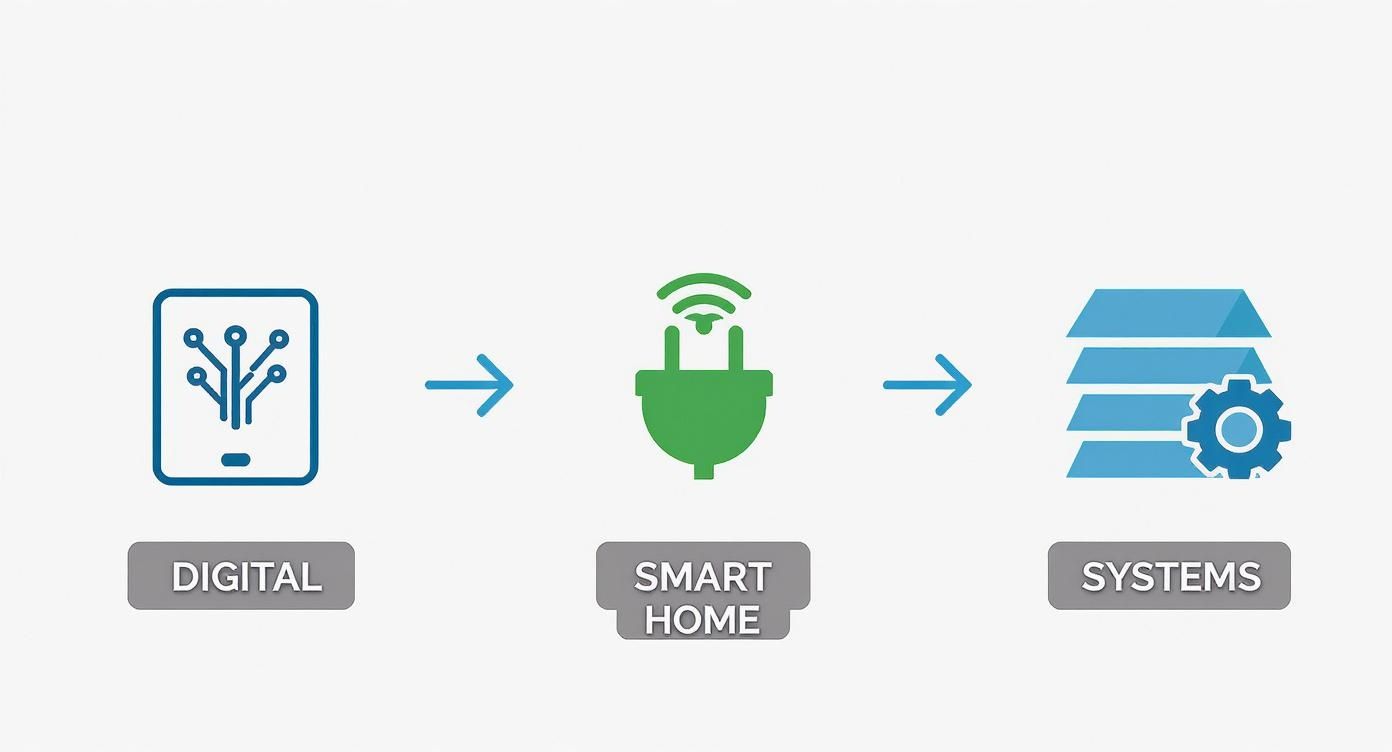
It’s a simple visual that helps you decide if a digital app, a physical smart device, or just a better system is the best fit.
Mini Case Study: The Family Command Center
The Before: A constant storm of texts. "Can you grab Maya from soccer?" "Did you remember the dentist on Thursday?" Critical dates and reminders are scattered across sticky notes, random text threads, and your already overloaded brain.
The After: A single source of truth. Every family appointment, school event, and to-do is logged in a shared digital calendar (like Google Calendar) that syncs instantly to everyone's devices. Now, everyone knows what’s happening, and automatic notifications ensure nothing falls through the cracks.
Setting this up is surprisingly painless:
- Create a new shared calendar and send an invite to your partner.
- Get into the habit of immediately adding any new appointment or event. Don't wait.
- Set up default notifications for all events (like 1 day and 1 hour before) so the reminders are automatic.
Pro-Tip: Color-code everything. Give each family member their own color, plus one for school events and another for bills. It instantly makes the calendar scannable, turning a wall of text into a clear, visual plan you can understand at a glance.
This idea of automating routines isn't just a household hack; it's a massive deal in the business world. The global financial automation market is on track to hit $20.7 billion by 2032, growing at a blistering 14.2% each year. Companies are throwing money at these solutions because they slash errors and free up thousands of hours—in fact, 54% of them expect a return on their investment within just one year.
Mini Case Study: The “Good Morning” Routine
The Before: A frantic, clumsy start to the day. You stumble out of bed in the dark, fumble for the light switch, and wait impatiently for the coffee maker to brew while trying to rally the kids. It's a chaotic, reactive scramble from the second your eyes open.
The After: A smooth, gentle takeoff. You just say, "Hey Google, good morning," and a pre-set routine kicks in. The lights slowly fade on, the smart plug on your coffee maker clicks to life, and your speaker starts playing some calm morning music.
A simple smart home routine is a fantastic first dip into physical automation.
- Grab a Smart Plug: Think of this as the gateway drug to a smart home. They’re cheap and can make any "dumb" appliance a little bit smarter.
- Use Your Voice Assistant App: Whether you’re on Team Alexa, Google, or Siri, open the app and find the "Routines" section.
- Build Your Routine: First, set the trigger (a voice command, a specific time, or your morning alarm). Then, add the actions you want to happen: turn on the coffee maker plug, set the smart lights to a warm glow, and play that "Chill Morning" playlist.
As you start exploring your own workflows, remember that automation can also mean delegation. For instance, figuring out why outsource laundry might be the biggest automation win of all. Just like a smart plug takes over a tiny task, a laundry service can automate an entire category of work, freeing up hours every single week. These examples show that winning at automation isn't about complexity; it’s about finding a point of friction in your day and applying a simple, targeted fix.
Fine-Tune Your Systems for Lasting Success
Alright, you've dipped your toes in the automation pool and set up your first few workflows. High five! But I've gotta let you in on a little secret: this isn't a crockpot. You can't just "set it and forget it."
Life, especially with kids, is a beautiful, chaotic mess that's always changing. The real magic happens when you learn to fine-tune your systems as your family grows and your needs shift. This is how you make automation stick. Think of yourself as the brilliant mechanic of your own household, keeping that well-oiled machine humming along.
So, How Do You Know It's Actually Working?
The easiest way to stay pumped about this is to see the payoff. And the most important metric isn't a spotless house or money saved (though those are nice perks!). It’s time reclaimed. How many precious hours did you win back this week?
You don’t need a complicated spreadsheet for this. Just do a quick gut check.
Before you started, how long did you spend agonizing over meal plans and grocery lists? Two hours? Maybe three? Now, with a sidekick like Meal Flow AI, you’re probably clocking in at around 15 minutes. That’s a staggering win. You’ve literally gifted yourself hours of your life back, every single week.
Take a second to let that sink in. You’ve figured out how to get robots to do your boring stuff, and the payoff is real, tangible time you can now spend doing things you actually love.
Try jotting down these little victories in a notebook or the notes app on your phone. Seeing things like, "Saved 2 hours on meal prep" or "Robot vacuum saved me 30 minutes" is an incredible motivator. It makes you want to find the next time-sucking task to zap.
Troubleshooting the Inevitable Hiccups
Look, no system is perfect. Your shiny new automated world is going to hit a few snags. The goal isn't to create a flawless utopia but to get really good at fixing the little bumps so you don't throw the whole system out the window in a fit of frustration.
Here are a few classic scenarios I’ve run into and their super simple fixes:
- The Problem: The AI-generated meal plan suggests that one broccoli casserole your toddler projectile-vomited last time.
- The Tweak: Don't scrap the whole week's plan! In Meal Flow AI, you can just swap out that one meal in seconds. Better yet, find the feature that lets you add that dish to a "never again" or "dislikes" list so it stops haunting your future plans.
- The Problem: The smart plug that's supposed to start the coffee maker has gone rogue and is stubbornly offline.
- The Tweak: Nine times out of ten, this is a simple Wi-Fi hiccup. Before you do anything drastic, just unplug the smart plug, count to ten, and plug it back in. A quick reset is the magical cure for most smart device weirdness.
- The Problem: You set up a gorgeous shared digital calendar, but nobody in your family is actually looking at it.
- The Tweak: This is a human problem, not a tech problem. The key is to build a new habit. Make the calendar the centerpiece of a quick weekly family huddle. Go over the week's appointments and activities together. After a few weeks, it'll become the go-to source of truth. For a deeper dive, check out our guide on how to stick to a routine.
Adapting as Your Life (and Kids) Evolve
The automations that are your lifeline today might need a refresh next year. The system that's perfect for life with a toddler will need some tweaks when that same kid starts kindergarten and joins a soccer team that practices three times a week.
Get into the habit of doing a quick "systems check" every few months. It's not another chore, I promise. Just ask yourself a few quick questions:
- Is this still saving me time and brainpower?
- Has our schedule or routine changed recently?
- Is there a new point of friction that I could smooth over with automation?
Maybe your "Good Morning" routine needs to kick off 15 minutes earlier to avoid the pre-school dash. Or perhaps your kids are on a major dinosaur chicken nugget kick, and it's time to update your food preferences in your meal planning app.
This is just a quick, five-minute tune-up to make sure your systems are still working for you. By staying flexible, you ensure the time you’re saving today will keep compounding for years, freeing you up for more pillow forts, story times, and all the good stuff.
Got Questions About Automating Your Home? Let's Talk.
Jumping into home automation can feel a bit... much. It conjures up images of expensive, complicated gadgets and maybe a little too much sci-fi. But honestly, once you cut through the noise, it's just about finding smart ways to make your life easier.
Let's break down some of the biggest questions and worries that come up when you decide to finally stop doing the same boring tasks over and over. You really can see a huge difference without breaking the bank or needing a PhD in robotics. It’s all about starting small and hitting your biggest annoyances first.
Isn't This Going to Be Super Expensive and Complicated?
Nope! This is probably the number one myth that keeps people stuck. You can literally get started for free, today, with stuff you already have. Think shared calendars or a basic to-do list app on your phone. The trick is to go after the "low-hanging fruit"—those little tasks that cause the most daily headaches.
When it comes to meal prep, a seriously effective tool like Meal Flow AI is a perfect example of a low-cost, high-impact solution that saves you hours right out of the gate. And smart home gadgets? They've gotten so much cheaper. A single smart plug can cost less than a family pizza night and can get your coffee maker brewing before you even get out of bed.
You don't need a crazy, futuristic smart home to get your time back. Just solving one major pain point—like the never-ending "what's for dinner?" saga—can create a massive positive ripple effect across your entire week.
The goal isn't to automate your entire life overnight. Just pick one thing. Maybe it's groceries. Maybe it's keeping track of appointments. Nail that one thing, and the confidence (and extra time!) you get will be all the motivation you need for the next project.
Okay, But How Much Time Can I Really Save?
It’s different for every family, of course, but the results can be pretty shocking. Just by getting your meal planning and grocery list on autopilot, it's easy to reclaim 2-4 hours every single week. Imagine that. No more blankly staring into the fridge, no more wandering the grocery store aisles like a zombie.
Then you can start layering in other simple wins:
- Robot Vacuum: You get back 30-60 minutes a few times a week. It’s a game-changer.
- Automated Bill Pay: This one is huge. It completely removes the mental load of tracking due dates, saving at least an hour a month and a ton of stress.
- Shared Family Calendar: This simple tool can kill dozens of back-and-forth "are you free?" texts and prevent those infuriating scheduling mix-ups.
Add it all up, and pulling back 5-8 hours a week is totally within reach. But it's not just about the clock. The real magic is in reducing "decision fatigue"—that feeling of being completely drained from making a million tiny choices all day long. Getting that mental energy back? That's the real prize.
What if My Family Hates All These New "Systems"?
This is such a real and valid fear. The secret? You have to make them part of the plan and focus on the "what's in it for them" angle.
Instead of just dropping a new rulebook on the table, pitch it as a family mission to get more fun time back. When you're setting up a meal planning tool, have the kids add their absolute favorite meals to the rotation. When you roll out the shared calendar, show your partner how it means you can finally lock in date nights, not just track soccer practice.
Start with the automations that give them an immediate, obvious win—like making sure their favorite snacks magically appear on the auto-generated grocery list. Once they see how these systems actually make life run smoother and lead to more time for the good stuff, they'll be on board before you know it.
---
Ready to stop the meal prep madness and reclaim your evenings? See how Meal Flow AI can generate your weekly meal plan and grocery list in minutes. Start your journey to a simpler week!