Your Ultimate Meal Planner Shopping List App Guide
Stop the dinner chaos. Discover how a meal planner shopping list app can streamline your life, save money, and make mealtime peaceful again. Get started now!
Love This Article?
Get personalized meal plans with recipes like this, automatically matched to your nutrition targets.
Think of a good meal planner shopping list app as your own personal kitchen assistant. Seriously. It's designed to take the chaos out of feeding a family, cut down on stress, and maybe, just maybe, give you back a few precious minutes of your day. It’s a smart tool that handles everything from finding recipes to writing your grocery list, finally putting an end to the dreaded "what's for dinner?" question.
End the Daily 'What’s for Dinner' Panic
It's 4 PM. Do you know where your dinner plan is? If that question just sent a shiver down your spine, you're not alone. That daily moment of panic is a universal truth for busy parents everywhere. It's a symptom of the never-ending mental load that comes with running a household. Squeezed between school pickups, soccer practice, and a mountain of laundry, figuring out dinner can feel like the final boss battle of the day.
This is about more than just food; it’s about decision fatigue. The relentless cycle of planning, shopping, and prepping is just plain draining. This is where a meal planner shopping list app comes in—not as another complicated piece of tech, but as a real-life solution to help you reclaim your evenings.

A Modern Fix for Old-School Kitchen Chaos
If you're looking for a better way, you're in good company. The market for these digital sous chefs is exploding, valued at an estimated US$2.5 billion in 2023 and expected to jump to nearly US$4.0 billion by 2028. That's a whole lot of parents saying "enough is enough!" to dinner-time drama. This growth signals a huge shift toward tools that make our lives easier and healthier.
This guide gets it. We’re zeroing in on the practical, real-world steps to make these apps actually work for your family. The goal is to get you way beyond just saving recipes online.
A great app should feel like it was designed just for your kitchen. It needs to know one kid despises onions, remember your foolproof taco Tuesday recipe, and have the grocery list ready to go before you even have to ask.
To truly silence that daily dinner panic, it helps to nail down the basics of how to plan weekly meals without the stress. These apps take those fundamental principles and put them on autopilot, handling the tedious stuff so you can focus on what matters—like actually enjoying a meal with your family. We'll walk you through how to pick the perfect one, set it up just right, and uncover all the features that will save you time and money.
Choosing the Right App for Your Family
Diving into the world of meal planner apps can feel like walking into a Costco on a Saturday—total sensory overload! With a million options all promising to change your life, how do you pick one that won't just end up collecting digital dust on your phone?
Forget the flashy ads. The secret is to zero in on the features that will actually make your life as a mom easier, not more complicated.
The absolute first thing I look for is an interface that doesn't make me want to throw my phone across the room. If figuring out the app feels like assembling IKEA furniture without the instructions, you'll never use it. The best ones are simple and visual. You should be able to drag a recipe onto your calendar, tweak the serving size in a second, and see your whole week laid out without having to click through a dozen menus.
Finding Kid-Approved Recipes Fast
Let's be real: your fancy new app is totally useless if its recipe database is packed with gourmet meals that require a culinary degree and two free hours. When you've got kids, you need a library overflowing with quick, simple, and picky-eater-approved options.
When you're comparing apps, look for these specific recipe features:
- Super-Smart Filters: Can you instantly filter for meals that take under 30 minutes? Or search by a main ingredient, like that chicken you really need to use up tonight? This is a must.
- A "Family Favorites" Folder: You need a way to save your own tried-and-true recipes. If I can't easily add "Grandma's Famous Spaghetti" to my weekly plan, it's a dealbreaker.
- Honest-to-Goodness User Ratings: Reviews from other parents are pure gold. They're the ones who will tell you if that "quick and easy" chicken bake was a genuine hit with their five-year-old or a total flop.
The goal is to find an app that slots right into your family's crazy rhythm. For a head-to-head comparison of what's out there, check out our complete guide to the best meal planner software to see how the top contenders stack up.
Seamless Shopping and Smart Integrations
Okay, this is where the real magic happens. A great app doesn't just help you plan meals; it transforms that plan into a perfectly organized shopping list with zero effort from you.
A basic app will just give you a jumbled list of ingredients. A smart app, on the other hand, does the heavy lifting for you. It knows you don't need three separate entries for "onion" and automatically groups them. It sorts your list by aisle so you're not zig-zagging through the grocery store.
My personal game-changer was finding an app with seamless grocery delivery integration. The ability to send my complete, AI-generated list to Instacart with a single tap saves me at least an hour every single week. No more impulse buys, no more forgotten essentials.
This is what separates the good from the great. It's about finding a tool that genuinely cuts down your mental load and adapts to your life, not the other way around.
---
With so many options, it helps to have a quick checklist of what really matters. Here’s a rundown of the must-have features that will make the biggest difference for a busy mom.
Essential App Features for Busy Moms
| Feature | Why It Matters | Look For This |
| Grocery Delivery Sync | Saves you a trip to the store. This is the ultimate time-saver for hectic weeks. | Direct integration with services like Instacart, Amazon Fresh, or Walmart. |
| Smart List Sorting | Prevents you from running back and forth across the store for forgotten items. | The ability to automatically categorize items by aisle (e.g., Produce, Dairy, Meat). |
| Recipe Customization | Allows you to swap ingredients, adjust serving sizes, or add your own family recipes. | Features like "Edit Recipe," "Adjust Servings," and an option to "Add Your Own Recipe." |
| Cross-Device Sync | Lets you plan on your laptop and shop from your phone without missing a beat. | Cloud-based accounts that update in real-time across multiple devices. |
| Dietary Preference Filters | Makes it easy to find meals that work for everyone, from picky eaters to allergies. | Robust filtering for gluten-free, dairy-free, vegetarian, nut-free, etc. |
---
Ultimately, the best app is the one you’ll actually use consistently. Don't get swayed by a million bells and whistles you'll never touch. Focus on these core features, and you'll find a tool that feels less like a chore and more like a true kitchen sidekick.
Setting Up Your App for Mealtime Success
Alright, you’ve picked your app and downloaded it. Now for the really fun part: turning this thing into your personal kitchen command center. Think of this initial setup like training a new assistant—the more you tell it about your family's chaos, the better it gets at saving your sanity. We’re going way beyond just creating a login here.
The real magic happens when you dive into the personalization settings. This is where you spill all the tea on your family’s quirks. For instance, my oldest has a serious nut allergy, so the very first thing I do with any new app is set a "nut-free" dietary restriction. Boom. Instantly, any recipe that could cause a problem for school lunches vanishes. That peace of mind is priceless.
Spending a few minutes on this now will pay you back a hundred times over. You're basically building a system that knows what you need before you even know what you need.
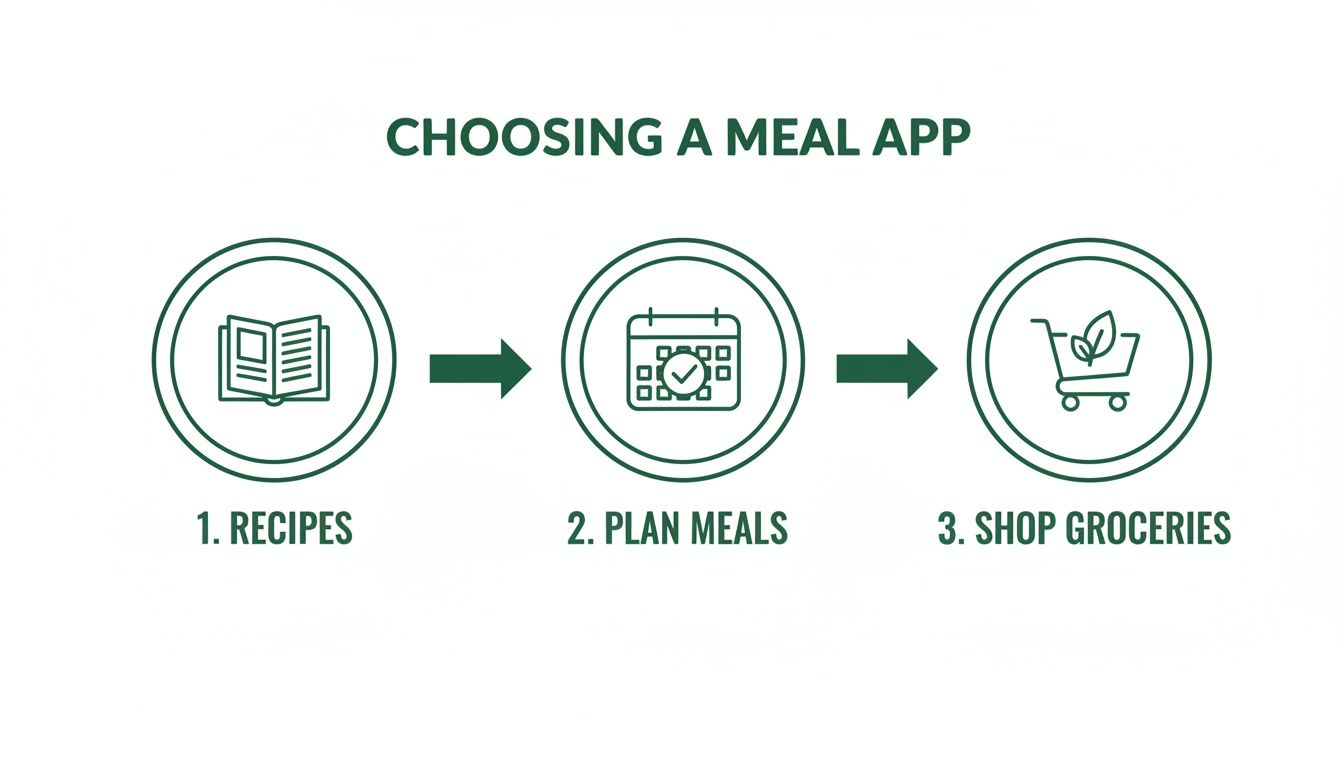
This whole recipe-to-plan-to-shopping flow is the backbone of any good app, but it's the nitty-gritty setup that makes it feel like it's reading your mind.
Fine-Tuning Your Family's Profile
Let’s get into the details that actually prevent those dinner-time meltdowns. Most apps let you create profiles or list preferences for each person in the house. Got a picky eater who acts like mushrooms are pure poison? Add "mushrooms" to their dislike list. It's a tiny step, but it stops the app from ever suggesting that creamy mushroom risotto, saving you from a world of pain.
Another game-changer is syncing the app with your family's calendar. I link mine straight to our Google Calendar, which is basically a color-coded explosion of soccer practices, dentist appointments, and school events.
Syncing your calendar lets the app see your jam-packed Tuesday and proactively suggest 20-minute meals for that night. It’s like having a sidekick who knows you need an easy win.
I can’t tell you how many times this simple feature has saved us from the siren song of last-minute, overpriced takeout.
Connecting Your Kitchen and Your Grocer
This last step is the one that will make you feel like a legit genius. Connect your app directly to your go-to grocery delivery service, whether it’s Instacart or Amazon Fresh. This is the key that unlocks the one-tap shopping list, and trust me, it feels like witchcraft.
Once you’ve linked your accounts, take a second to set up a "pantry inventory." Most modern apps have this, letting you check off all the staples you already have—think olive oil, salt, that giant bag of rice from Costco.
Here’s why this little inventory check saves you real money:
- No More Double-Buys: The app is smart enough to see you have olive oil and automatically takes it off your shopping list. Hallelujah.
- Less Food Waste: It'll nudge you to actually use those three cans of black beans hiding in the back of the cupboard before buying more.
- Saves Brain Power: You never have to play the "do I or don't I have paprika?" guessing game again.
This is the heart of a truly automated grocery list. By getting your profile, preferences, and integrations all sorted out, you're not just using an app—you’re running a highly efficient, stress-reducing mission control for your entire kitchen.
Your First Week of Automated Meal Planning
Alright, you’ve got your profile dialed in and your accounts are linked up. Now for the fun part—let's see what this thing can really do. We're about to generate your first-ever weekly plan and watch the app handle all the grunt work. This is where the magic happens.
Getting started is refreshingly straightforward. Most apps have a big, obvious button that says something like "Generate New Meal Plan." Just pick the dates for the week ahead, double-check how many mouths you're feeding, and let it rip. Seriously, that's it. In less time than it takes to find a matching pair of toddler socks, the app will fill your calendar with a week's worth of dinners, all based on the preferences you just set.

This kind of tech is quickly becoming the new normal for families. It’s no surprise the market for these apps is predicted to explode from US$972.1 million in 2024 to an incredible US$11.57 billion by 2034. Families are jumping on board, with parents logging in about four times a week for nearly 15 minutes at a time to keep things running smoothly. You can dig deeper into the rise of AI in meal planning on market.us if you're curious.
Making the Plan Your Own
The first plan the AI spits out is a fantastic starting point, but think of it as a first draft, not a final command. Now you get to play editor. Maybe the fish tacos it suggested for Tuesday sound amazing, but you know deep in your soul that Friday is, and always will be, pizza night. No problem—swapping meals is usually as simple as dragging and dropping.
Here’s a peek at how I typically fiddle with my first plan of the week:
- Give it a once-over: I scan the seven days to see what the AI came up with. I'm often surprised by a new recipe idea that I never would have thought of on my own.
- Swap for sanity: I pull up our family calendar. If I see soccer practice runs late on Wednesday, I’ll swap in a 20-minute "emergency meal" from my saved favorites.
- Tweak the portions: My in-laws are coming over Thursday? I'll just tap the recipe and bump up the serving size. I'll do the same if I want to guarantee leftovers for lunch the next day.
The real genius of a good meal planner shopping list app is its flexibility. Life with kids is anything but predictable, and your meal plan needs to be able to roll with the punches. A last-minute playdate or a sudden craving for mac and cheese shouldn't throw your entire week off the rails.
Once you’ve got the week looking just right, you’re ready for the grand finale.
From Plan to Pantry with One Click
Get ready for the moment that will make you a true believer. You'll see a button that says something like "Create Shopping List" or "Add to Cart." When you tap it, the app instantly scans every single ingredient from every recipe on your plan. In a flash, it generates a perfectly organized, categorized grocery list.
No more frantic scribbling on the back of a crumpled envelope. No more getting home only to realize you forgot the sour cream. The app is even smart enough to check what you’ve marked as already in your pantry and remove those items from the list.
Now for the real game-changer. Instead of grabbing your keys, you simply send that beautiful list straight over to Instacart or your favorite grocery delivery service. You can give the cart a quick review, add in the non-negotiable snacks (because...kids), and schedule your delivery.
Just picture it: instead of wrestling a shopping cart through a crowded aisle with a toddler on the verge of a meltdown, you're on the couch, coffee in hand, scheduling your groceries to arrive at your door. This isn’t just convenient; it's a complete overhaul of a dreaded weekly chore. Welcome to your new, ridiculously less-stressed routine.
Insider Hacks to Save Time and Money
Okay, so you've got the basics down. You’re planning meals and making shopping lists. But now it’s time for the fun part—the little tricks that turn your meal planner shopping list app from a handy tool into your kitchen's secret weapon. These are the moves that will have you wondering how you ever survived without them.
One of my absolute favorite tricks is starting with theme nights. I’m talking about "Taco Tuesday," "Soup & Sandwich Saturday," or even "Leftover Remix Friday." It sounds simple, but it's a game-changer for that dreaded "what's for dinner?" paralysis.
Instead of a million recipe options staring you down, your focus instantly narrows. On Monday morning, you're not lost; you're just thinking, "What kind of pasta sounds good tonight?" It's a tiny mental shift that saves so much energy.
Make Your App a Food Waste Warrior
Let’s be real—we’ve all found that sad, forgotten bag of spinach wilted in the back of the fridge. The average family tosses a shocking amount of food, and your app is the perfect sidekick to fight back.
Before you even think about generating a new meal plan, take a quick peek in your fridge. Got a half-used container of sour cream or some chicken that needs to be cooked ASAP? Perfect.
Just pop those ingredients into the app's search bar and see what recipes it suggests. This "shop your fridge first" mentality is the cornerstone of how you can master food waste reduction strategies. You’ll be amazed at how much less you throw away and how that translates directly to a smaller grocery bill.
Pro Tip: I love creating an "Use It Up!" tag or folder in my app. Whenever I spot an ingredient on its last legs, I'll tag a few recipes that use it. When it's time to plan, I just filter by that tag and poof—instant meal ideas that save me money.
This little habit turns your planner from a simple list-generator into an inventory manager for your entire kitchen.
Build Your Digital Family Cookbook
After a few weeks, you'll start to notice which meals get rave reviews and which ones... don't. Every time a recipe is a home run—you know, the rare meal where everyone cleans their plate—save it to a "Family Favorites" collection.
This hand-picked list is your lifeline on those hectic weeks when you're running on fumes and have zero creative energy.
- No-Brainer Meal Plans: When you’re slammed, you can build an entire week’s menu in two minutes flat just by pulling from this list.
- Picky Eater Proof: These are your tried-and-true winners, which means no dinner-table drama.
- Budgeting Gold: You’ve made these recipes before, so you have a pretty good idea of what they cost, making it much easier to stay on budget.
Putting these features to work is how you really get the most out of your meal planner shopping list app. For an even deeper dive into making your grocery budget work for you, check out our guide to budget-friendly meal planning. It's all about making the technology do the heavy lifting for you.
Got Questions? Let's Talk Meal Planning Realities
Alright, let's get real. Diving into a new app, especially one that promises to simplify the beautiful chaos of family life, can feel like a leap of faith. You're probably wondering if this thing can actually handle your crew's quirks.
Let's break down the common questions that pop up once you start using a meal planner shopping list app. I want you to feel totally confident you're not just downloading another shiny object.
"But My Kids Are So Picky... Can an App Really Handle That?"
Oh, I hear you on this one. You’ve got a kid who thinks green specks in food are a personal attack, and another who survives on three specific meals. Can an app truly understand that level of… selectiveness?
Surprisingly, yes. The good ones are designed for exactly this situation. You can usually go into the settings and blacklist specific ingredients for certain family members. So, if mushrooms are a hard "no" for your spouse, you can tell the app to banish them forever.
The system also learns from you. Every time you swap out a recipe or give a thumbs-down, it’s taking notes.
Here’s my pro-mom tip: Use the "favorites" feature religiously. When a meal gets a thumbs-up from everyone (a true miracle, I know), mark it as a favorite immediately. This is how you teach the app what your family actually eats, and the suggestions will get so much better over time.
"How Much Money Are We Really Talking About Saving Here?"
It’s more than you’d think, and it adds up fast. The savings come from a few key places. First, you stop making those impulse buys—no more wandering the aisles and tossing random, expensive snacks into the cart. Second, you dramatically cut down on food waste because your plan uses what you already have.
And the big one? You avoid those panicked, last-minute takeout orders that absolutely shred your budget. When you stick to the hyper-specific shopping list your app creates, trimming 15-20% off your grocery bill each month is totally achievable.
"What Happens If We Try a New Recipe and It's a Total Dud?"
It’s inevitable. Not every Pinterest-worthy recipe is going to be a winner. But a good app helps you learn from the flops instead of repeating them.
Before you even try a new dish, check out the ratings and comments from other users. You'll often find little gems of advice from other parents, like "double the sauce" or "my toddler actually ate this!"
If a meal bombs, don't just move on. Go back into the app and give it a low rating. This is super important because it tells the algorithm "never again." I also use the notes section to leave myself little reminders, like "way too spicy" or "needs 10 more minutes in the oven."
---
Ready to ditch the dinner dread for good? Meal Flow AI does the heavy lifting by creating personalized plans and sending your shopping list straight to Instacart.