Master Your Meals with a Meal Planning and Shopping List App
Stop wondering what's for dinner. This guide shows you how to use a meal planning and shopping list app to save time, reduce waste, and simplify your life.
Love This Article?
Get personalized meal plans with recipes like this, automatically matched to your nutrition targets.
If the question "What's for dinner?" sends a shiver down your spine, you're not alone. The daily scramble to figure out meals is a huge source of stress. The answer isn't a magic wand, but it's pretty close: a solid meal planning and shopping list app. These things are game-changers, turning your phone into the ultimate kitchen assistant.
Go From Dinner Chaos to Organized Calm
Picture this: no more 5 PM panic-trips to the grocery store. You know exactly what’s on the menu all week, and you have every single ingredient ready to go. This is more than just a fancy recipe box; it's about creating a system that actually brings peace back to your evenings.
What you're really doing is swapping mealtime anxiety for a smooth, predictable process that frees up your brainpower for more important things. Think of it less as downloading an app and more as adopting a whole new, saner workflow for your life.
The Real-World Wins of a Digital Meal Planner
So, what makes these apps so great? It's how all the little features connect. Forget juggling a paper list, a dozen open browser tabs with recipes, and your phone's calendar. Everything lives in one place, and that’s where the time and energy savings really kick in.
- Slash Your Food Budget: Planning ahead means you buy only what you need. Say goodbye to those impulse buys at the checkout and finally use up that jar of whatever-it-is in the back of your pantry.
- Massively Reduce Food Waste: When every ingredient has a purpose, you'll stop finding sad, wilted vegetables in your crisper drawer. It’s a win for your wallet and the planet.
- Get Your Time Back: Let the app build your shopping list—sorted by aisle, no less. This alone can cut your grocery store time in half. No more aimless wandering or forgetting that one crucial thing.
- Actually Enjoy Cooking Again: Stuck in a dinner rut? The app can suggest new recipes based on your family's preferences and dietary needs, making meals fun again instead of a chore.
At the end of the day, the goal isn't just to plan dinner. It's to knock out a major source of decision fatigue. By taking the guesswork out of "what's for dinner," these apps give busy parents their mental energy back.
And this isn't some niche trend. The meal planning app market was already valued at around $2.5 billion in 2023, and it's ballooning as more people hunt for ways to simplify their lives. You can dive deeper into the numbers and explore meal planning market insights if you're curious.
How a Meal Planning App Simplifies Your Life
To really get it, let's break down how the core functions of a great app work together to make your life easier. This isn't just about individual features; it's about how they create a seamless system from planning to plate.
| Feature | Primary Benefit | How It Helps You |
| Recipe Discovery & Import | Ends "Dinner Rut" Syndrome | Find new meals based on your family's tastes, import favorites from websites, and keep things interesting. |
| Drag-and-Drop Meal Calendar | Effortless Weekly Planning | Visually plan your week in minutes. Easily swap meals around if plans change. |
| Auto-Generated Shopping List | Saves Time & Money | The app instantly creates a grocery list from your meal plan, preventing forgotten items and impulse buys. |
| Grocery Delivery Integration | Ultimate Convenience | Send your perfectly curated shopping list directly to a service like Instacart for delivery. No store trip needed! |
| Pantry & Fridge Tracking | Reduces Food Waste | "Shop your pantry" first. The app knows what you already have, so you don't buy duplicates. |
Putting a system like this in place is a total game-changer for household management. Once your kitchen is running smoothly, you might be inspired to discover other smart apps to automate your daily life.
Now, let's get into the nitty-gritty of setting it all up.
Make the App Your Personal Kitchen Genius
Alright, let's get this app working for you. Straight out of the box, it's just a cool piece of tech. The real magic begins when you teach it about your family. Think of it like training a new personal assistant—the more it knows, the more it can help.
Your very first mission is to build out your profile. And I mean really build it out. Don't just pop in your name and call it a day. Are you feeding a family of four with a kid who thinks green things are poison? Are you and your partner trying to go low-carb? Is cilantro the bane of your existence? Spill all the details.
Taking a few minutes to do this now is the secret sauce to making meal planning stick. You're essentially training the app's brain to filter out all the random recipes you'd never make and only serve up the good stuff.
Dialing in Your Family's Tastes
Being specific is the name of the game here. Don't just check the "healthy" box. Dig into the settings and tell it what "healthy" actually looks like for your family. The best apps let you get super granular.
Here’s where you want to focus your attention:
- Household Size: Plug in the number of adults and kids. This is huge! The app will automatically scale recipes up or down, which means less food waste and more money in your pocket.
- Dietary Restrictions: Go through and check off everything that applies. We’re talking dairy allergies, nut-free needs, gluten sensitivities, or even lifestyle choices like vegetarian, vegan, or paleo.
- Ingredient Blacklist: This is my favorite part. You can literally ban ingredients your family hates. No more finding the "perfect" chicken recipe only to discover it’s loaded with mushrooms, the one food your toddler launches across the room.
The more information you feed the app right now, the smarter it gets. You’re not just fiddling with settings; you’re building a personalized recipe filter that saves you from scrolling through a million duds. The whole point is to make the app do the hard work for you.
If you’re a tech nerd like me and want to see how this all works behind the scenes, you should check out our deep dive on the best AI meal plan generator to see how this smart tech is making our lives so much easier.
Hook Up Your Grocery Delivery and Win Back Your Weekend
Okay, this next step is the real game-changer. You're going to connect your meal planning app directly to a grocery service like Instacart. This is what truly closes the loop, taking you from a plan on your phone to groceries at your front door. It’s glorious.
Inside the app’s settings, you’ll find an option to link your accounts. It's a quick, secure process where you give the app permission to chat with Instacart and then pick your favorite local grocery stores.
Here's what it looks like inside Instacart when you're choosing the stores you want to shop from.
Once you’ve got them linked, your app knows exactly which stores you use, making the whole shopping part ridiculously smooth.
When your weekly shopping list is ready, you'll see a beautiful little button that says something like "Send to Instacart." You tap that, and your entire, perfectly organized list zips over into a shopping cart, ready for checkout. It's the ultimate hack for busy parents. Seriously.
Alright, let's get to the good stuff—turning all those settings and preferences into a real-life menu your family will actually eat. This is where we stop dreaming and start doing. No more standing in front of an open fridge at 5 PM, waiting for a miracle.
The core of this whole system is the recipe collection. Think of it less like a dusty old cookbook and more like a brilliant chef who already knows your family’s tastes. Instead of getting lost in a sea of endless recipes online, you can slice and dice the options to find exactly what you need, right now.
For example, on a Tuesday when you've got zero time, you can tell the app you need something that takes under 30 minutes. Got some chicken thighs that are nearing their expiration date? Just search for recipes that use them up. It's all about finding the right meal for the moment.
Drag, Drop, and Dinner is Done
This part is my favorite. Once you spot a recipe you like, you literally just drag it over and drop it onto your weekly calendar. It’s so satisfying watching those empty days fill up, turning a week of “What’s for dinner?” into a clear, delicious plan. You can shuffle meals around, swap Tuesday with Thursday, and build a schedule that works for your family's crazy life.
Seeing your week laid out visually is a total game-changer. You can spot if you’ve accidentally planned pasta three nights in a row (we’ve all been there) or realize you need to squeeze in some more green veggies. It gives you a big-picture view that a simple written list just can’t compete with.
But where the real magic happens is with the app’s smart suggestions. This isn't just a digital recipe box; it’s a system that actually learns what you like.
- It spots your habits: If you tend to make quick chicken dishes on weeknights, it’ll start bubbling up similar speedy recipes for you.
- It remembers what you love: Gave that Thai green curry five stars? The app will go find other top-rated Thai recipes it thinks you'll enjoy.
- It helps you escape the dinner rut: It can gently push you to try new things based on your old favorites, making it fun to discover your next go-to meal.
This kind of smart, personalized help is why the AI-driven meal planning market is absolutely blowing up. It was valued at nearly $1 billion recently and is on track to get even bigger as more of us turn to our phones to make life easier. You can dig into the data on AI's growth in meal planning if you're curious.
A Real-World "Crazy Week" Plan
Let's walk through a real-world example. It’s Sunday night. You glance at the calendar and see soccer practice, a late work meeting, and parent-teacher conferences. The mission: create a "Busy Weeknights" menu where every single dinner is on the table in 30 minutes or less.
Scenario: Build a 5-day dinner plan where nothing takes more than 30 minutes to cook, using a mix of cuisines the kids won't complain about.
- Monday: I’ll start by filtering for "Under 30 Minutes" and "Kid-Friendly." A one-pan lemon herb chicken and veggies recipe pops up. Boom. Drag it to Monday.
- Tuesday: It’s Taco Tuesday, a non-negotiable in my house. I'll search for "ground beef" and "20 minutes" and find a quick taco skillet recipe. Dropped onto Tuesday.
- Wednesday: Feeling something cozy. I filter by "Italian" and "Under 30 Minutes," and a creamy tortellini soup is suggested. Yes, please. Onto Wednesday it goes.
- Thursday: The app, picking up that I like one-pan meals, suggests a 25-minute sheet pan sausage and peppers recipe. Done. I'll add that to Thursday.
- Friday: Pizza night! I'll just add my own saved family recipe for super-fast naan bread pizzas.
And just like that, in maybe ten minutes, I've gone from a week of meal-time anxiety to a complete, delicious, and totally doable plan. That is the power of a good meal planning and shopping list app.
Turn Your Meal Plan into a Smart Shopping List
Alright, this is where the magic really kicks in. You've just created a week's worth of delicious meals, and now you get to see that plan transform into a perfectly organized shopping list—without you having to do a single thing.
Forget scribbling on the back of an envelope or texting yourself a random list of ingredients you'll forget by the time you get to the store.
Once your meal plan is locked in, the app instantly scans every recipe and pulls all the ingredients you'll need. It's like having a personal assistant who knows exactly what you're thinking, making sure that one crucial clove of garlic or can of diced tomatoes doesn't get left behind. This is the superpower of a great meal planning and shopping list app.
This little graphic perfectly captures the flow from finding recipes to having a solid plan.
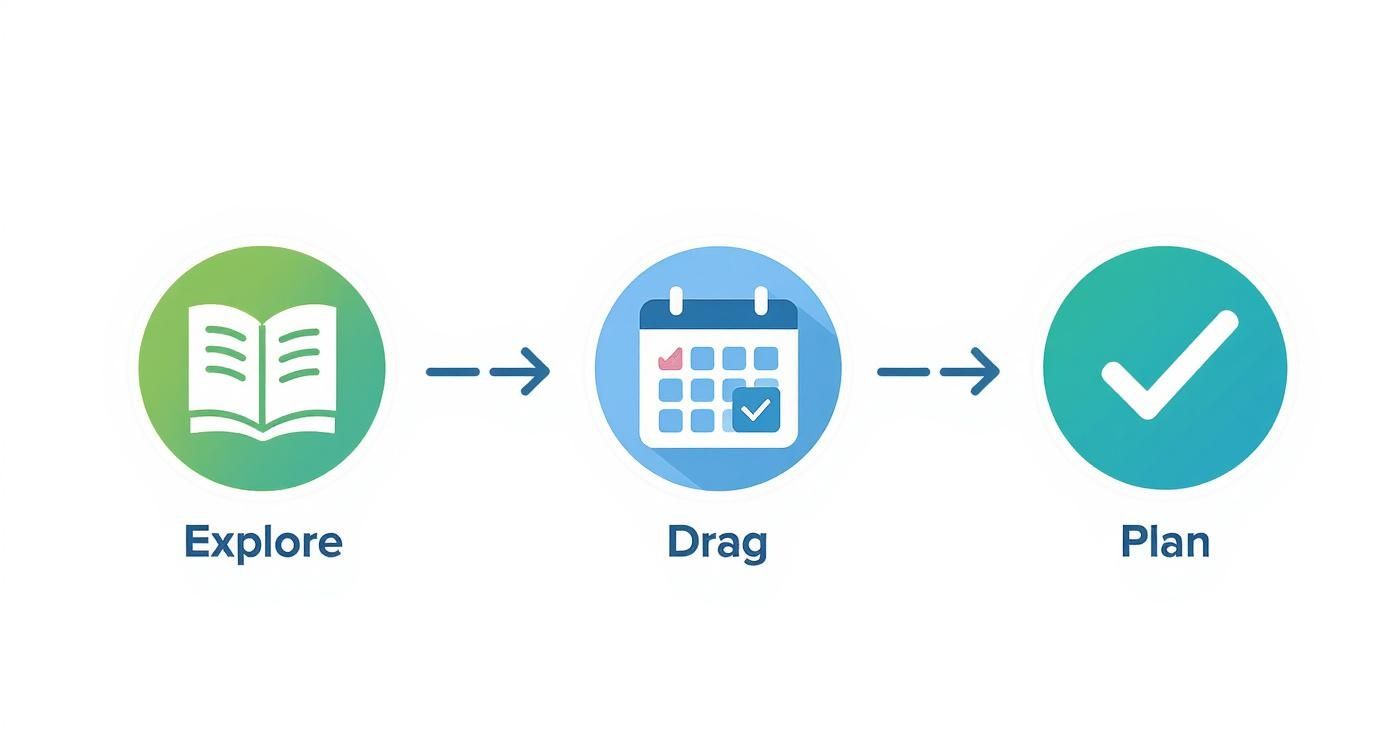
It really is that simple—a few intuitive clicks and your whole week is mapped out.
Your Smart List Does the Heavy Lifting
The real genius here isn't just that a list gets made for you; it's how it's made. The app is smart enough to consolidate everything. If Monday’s chicken and Tuesday’s tacos both call for a yellow onion, your list will just say "2 yellow onions." No more doing frantic math in a crowded aisle!
Even better, it sorts everything for you based on how a typical grocery store is laid out:
- Produce: All your fruits and veggies are rounded up in one spot.
- Dairy & Meats: Cheese, milk, chicken, and beef all have their own little sections.
- Pantry Staples: Canned goods, spices, and grains are all neatly organized.
This intelligent sorting makes your shopping trip ridiculously efficient. You can just breeze through the store, section by section, without ever having to backtrack for something you missed. Want to dive deeper? Check out our guide on the ultimate grocery shopping list generator to see just how much time this can save you.
Take Control of Your List
Automation is amazing, but you're always in the driver's seat. Before you head out or send your order for delivery, you can easily tweak your list.
The most powerful feature of a smart shopping list is the "pantry check." It’s a simple but effective step where you quickly scan the list and uncheck anything you already have, like olive oil or that giant bag of rice from Costco. This single habit can slash your grocery bill.
Need to stock up on coffee? Just add it. Decided to swap broccoli for green beans? A quick tap is all it takes. This workflow completely removes the mental load of building a list from scratch and ensures you buy only what you actually need. Hello, savings
Real-World Strategies for Busy Parents
Alright, multitasking masters, this section is for you. Having a great app is one thing, but making it your secret weapon against dinner-time chaos is a whole different ball game. These are the battle-tested tactics real parents use to win back their time and sanity.
Let’s be honest, you don't have time to reinvent the wheel every week. The real goal is to build a system that practically runs itself, especially when life gets completely bonkers. Think of your meal planning and shopping list app not just as a recipe book, but as the command center for your entire food operation.
The "Cook Once, Eat Twice" Golden Rule
Batch cooking is the ultimate time-saving hack, and your app makes it ridiculously easy. Did you find a chili recipe the whole family actually devoured? Don't just make enough for one night!
With a single tap, you can double the recipe's serving size, and the app will instantly update your shopping list with the new quantities. Boom. Monday’s chili magically becomes Wednesday’s chili dogs or Thursday’s loaded baked potatoes. It’s the easiest win you'll get all week.
Create Your Emergency Meal Plans
We all have those weeks. The ones where there's soccer practice every night, a massive school project is due, and you have zero creative energy left in the tank. For times like these, you need pre-built meal plan templates.
Create and save a few plans with names that make sense to you:
- "Soccer Practice Survival" — Nothing but 20-minute, one-pan meals.
- "Pantry Clean-Out" — A week of recipes that use up all those cans and staples you already have.
- "The Easiest Dinners Known to Man" — A lineup of your family's absolute favorite, no-fuss meals.
When a chaotic week descends, you just load the template, generate the list, and breathe a huge sigh of relief.
The real power comes from turning features into habits. By using templates and embracing batch cooking, you’re not just planning meals—you're building a resilient system that can handle whatever your family's schedule throws at it.
It's no surprise that these apps are taking off. In 2023, North America accounted for about 35% of the global market, mostly because we're a bunch of health-conscious folks who love using digital tools to make life easier. You can find more details about the meal planning app market on dataintelo.com.
Get the Whole Family on Board
Tired of being the sole decision-maker for every single meal? Time to outsource some of that mental load to your tiny assistants.
Assign one night of the week to each kid and let them scroll through the app's "kid-friendly" recipes to pick a meal. They get a sense of ownership, and you get one less dinner to worry about. It’s a fantastic way to get them excited about what's on the table and maybe even try a new food without a fight. For more great ideas, check out our complete guide on https://mealflow.ai/blog/meal-planning-for-busy-families.
Of course, if you're really looking to offload the work, some parents take it a step further by exploring options like hiring a private chef to manage the household's meals. Now that's a time-saver
Got Questions? We’ve Got Answers.
Jumping into a new app can feel a little like starting a new relationship. You've got questions, you're not sure how it'll fit into your life, and you want to know if it's really as good as it seems. That's totally normal.
Let's tackle some of the most common questions that pop up when people first get started with a meal planning app. Think of this as your personal FAQ session to get you planning like a pro from the get-go.
Can I Add My Own Family Recipes?
Oh, absolutely. In fact, you have to! This is where a good app becomes your app. Most of the best ones have a spot waiting for you to plug in those treasured family recipes—Grandma's legendary spaghetti sauce, your "secret" chocolate chip cookie recipe, all of it.
You just pop in the title, ingredients, and instructions. You can even add a photo to make it feel legit. Once it's saved, it's there forever, living right alongside all the other recipes in the app. The next time you want that specific taste of home, just drag it onto your weekly calendar. Some apps even let you paste a link from your favorite food blog, and it'll slurp up the recipe for you. Magic!
My Two Cents: Make a fun little project out of it. Add one family favorite to the app each week. In a month or two, you'll have a digital cookbook that actually reflects what your family loves to eat.
What if I Change My Mind Mid-Week?
Life is what happens when you’re busy making other (meal) plans, right? One kid suddenly decides they hate chicken, or you just get a random craving for tacos on a Thursday. No sweat. These apps are built for real life, which means they're flexible.
Swapping out a meal is usually as simple as dragging a new recipe onto the old one's spot. The real genius happens next: the app will ask if you want to update your shopping list.
- If you say yes, it zaps the ingredients for the old meal right off the list.
- Then, it adds whatever you need for the new meal.
It’s a tiny feature that makes a huge difference, keeping your plan and your list perfectly synced up without you having to think about it.
How Does the App Handle Ingredients I Already Have?
This is the feature that will literally save you money. We've all been there—buying a new bottle of paprika only to find three of them already hiding in the spice cabinet. A smart meal planning app is your secret weapon against buying duplicates.
After the app whips up your shopping list for the week, take 2 minutes and do a quick "pantry audit." Just walk through your kitchen with your phone, unchecking anything you already have. That's it. This simple habit can save the average family hundreds of dollars a year. The fancier apps even have a "digital pantry" feature where you can keep a running inventory of your staples.
Is My Data Secure When I Connect to Instacart?
This is a big one, and rightly so. Reputable apps take your security very seriously. When you link your meal planner to a service like Instacart, it uses something called a secure API (Application Programming Interface).
Don't let the techy name scare you. Just think of it as a super-secure translator that only passes along the necessary info—your shopping list—to get the order placed. All your sensitive stuff, like personal account info and credit card details, stays locked down tight within Instacart's own system. It's always a good idea to skim the privacy policy of both apps before you link them, just for total peace of mind.
---
Ready to stop wondering and start organizing? Meal Flow AI takes all the guesswork out of meal planning. Generate personalized weekly plans, create smart shopping lists, and send them directly to Instacart in just a few clicks. Visit https://mealflow.ai to start your free trial and transform your dinner routine today.